Thursday, February 09, 2006

Minor bug in MSBuild on x64 Machine

The reserved property MSBuildExtensionsPath apparently always returns "C:\Program Files\MSBuild" in the command line no matter where it is actually installed. Oops. On my x64 machine, this path is totally invalid, as all standard programs - including vs05 and related apps - are installed to "C:\Program Files(x86)\". Only 64-bit programs go into the standard "Program Files" path.

This does not appear to be true when compiling my modified project file in VS05. Not sure what to make of this discrepancy.
Submit this story to DotNetKicks

Friday, January 27, 2006

Regex Performance - RegexOptions.Compile

I have been working on a small project that utilizes Regular Expressions to do most of the heavy lifting. I have been aware of the Compile option, but haven't really experienced any benefit before. However, in this project it became clear that certain expressions were really bogging down the engine - causing the overall run to crawl. This expression was one that was slow:

(?<1>^\s*)Foo(?<2>[ ]\w*[ ])(Bar)(?<3>[ ][fF]un[ ])(?<4>\w*)(\s')

Strangely, it seems very like the others I was using that were not slow.

In any case, I was using the static IsMatch from the Regex class, so I switched to creating an instance of Regex with the Compile option and everything sped back up. Very handy. I haven't done any real analysis on what caused these certain expressions to be slow; I am sure my moderate understanding of RE has caused some inefficient syntax. I would like to look into it further, but it will have to wait...
Submit this story to DotNetKicks

Wednesday, January 18, 2006

XSLT to transform NAnt script to MSBuild

I undertook a side project to write an XSL transform to convert my existing NUnit scripts into MSBuild scripts. The exercise in XSLT was a good refresher for me, and it was a good way to learn MSBuild. Other than that I have to admit the result may be less than useful.

In any case, I have posted the xsl stylesheets.

The main problem I see in using these to any great value is that: first, you could just runNAnt from MSBuild; second, you need additional stylesheet entries for every task; and third, you would either have to write stylesheets for every function found, and potentially write the MSBuild task to substitute for the function. Not worth the effort.

Ah well, perhaps the stylesheets make a good tutorial on how to get things done. On the other hand, since I was just getting back to using XSLT for the first time in several years, perhaps you'll find errors or misuse.
Submit this story to DotNetKicks

Tuesday, January 17, 2006

Differences between NAnt and MSBuild

It's been a while since my last post, but I am back to make the comparison I previously promised between NAnt and MSBuild. Why? Mostly to learn about MSBuild. Partly to help with conversion between NAnt and MSBuild. I should point out right away that there is no explicit need to convert NAnt scripts to MSBuild. You can exectute NAnt from within MSBuild as a Task. Finally, I have not achieved guru status with either NAnt or MSbuild, so please rectify any mistakes below with a helpful comment.

That being said, on with the comparison:

1. NAnt has functions. MSBuild really has no such thing. MSBuild is infinately extensible via Tasks, but there aren't that many tasks as compared with NAnt functions. I think this is a sign of maturity in NAnt. Since MSBuild's programmers had NAnt to look at, we do have to wonder why they excluded some things but we can guess that dev timelines ran out.

2. NAnt has a few fileset types with specialized attributes. All file references in MSBuild are contained in ItemGroup blocks. However, with ItemMetadata providing infinite extensibility to each Item in an ItemGroup, the specialized attributes are not required.

3. In the main, the NAnt schema tends to be attribute centric, while MSbuild favors elements with text content. The NAnt schema also favors lowercase names, while MSBuild favors an initial capital.

4. NAnt allows fileset groups to be included inside a target. MSBuild Targets may only reference ItemGroups specified as children of the Project element.

5. MSBuild seems to be missing the notion of a basedir. This basedir attribute is very helpful in NAnt. MSBuild only has the project root as basedir, and can use PATH variables. Again, I think the maturity of NAnt shows in this oversite. Obviously, you can define a Property with an appropriate base directory Uri and append it to every path in an ItemGroup. You could probably also make use of ItemMetaData if you were writing a custom Task.

6. Property references in NAnt are denoted by ${}, while MSBuild uses $(). What is this, C# versus VB? You also cannot use '.' characters in your property names in MSBuild, though it is legal in NAnt.

7. MSBuild references Items in an ItemGroup with the syntax @(ItemName). NAnt references filesets by id utilizing a refid attribute without decoration.

8. There are 72 built-in tasks in NAnt. There are 35 in MSBuild, however most of the common tasks related to .net use are in there. They both include an Exec(exec) task for calling out to the system. They both allow you to write your own to extend the functionality of the build. So, if it can be done in code, you can run it from either one.

9. Both allow conditions to be placed on nearly every element to determine if the build should include the enclosing item. However, NAnt uses both an 'if' and 'unless' approach, where MSBuild just simply has 'Condition' that supports '!' (not); 'And'; and 'Or'. Here the MSBuild approach seems more streamlined.

10. MSBuild Projects can have multiple default targets, and also has an InitialTarget which can be run before other targets for prepatory steps. Utilizing 'depends'/'DependsOnTargets' attributes you could craft your own workflow in either program. Similar to the Default, you can have multiple targets specified in the DependsOnTargets attribute which is an interesting enahancement over NAnt.

11. A subtle difference in the CSC Task is that in NAnt, the warnings to ignore are elements which each have a condition. In MSBuild, warnings are a single attribute which contains a semi-colon delimeted list. In NAnt, you could conditionally ignore some warnings on some builds based on criteria. No such thing would be possible in MSBuild.
Submit this story to DotNetKicks

Monday, December 19, 2005

Using MSBuild - Don't learn from default build project file

If you are used to utilizing Ant or Nant to build your .net solutions, MSBuild is a fairly simple switch, though I still think Nant is more full-featured. However, the more I learn about MSBuild the less concerned I become with the available featureset.

One thing I did find confusing was the contents of the default build file generated by the VS IDE when you add a build type to a Team Project. This file is not a good way to learn about build files. First, it is based on a team foundation server based build. Second, it does not contain targets but depends entirely on the included targets file (Microsoft.TeamFoundation.Build.targets). This targets file can be valuable to learn from. I also recommend taking a peek at the MSBuild schemas (Microsoft.Buld.Core.xsd and Microsoft.Build.Commontypes.xsd)

If you build your own build file from scratch I believe you will find the experience more analogous to building with Nant. The thing about the default build file is that it is full of properties and item groups which have comments indicating how values should be specified to generate a proper build. However, this really only relates to the targets used by the included MS targets file. Great if you want a simple build, or don't care how its done. To learn the build syntax, throw away the default file and set about creating your own. I realize this is "wasted" effort since the default compile target is just fine but I prefer controlling everything and removing all 'MS Magic' from the project.

The MSDN docs are good enough to learn from, so I won't provide the basic info here. I will summarize a few basic thoughts:
  • Target has pretty much the same meaning as in Nant. There are other Nant analogies, especially with the built-in tasks. However, I would prefer to cover this in a more detailed explanation of Nant->MSBuild conversion issues.
  • ItemGroup collections can have any element content. The names of the elements within are used to dereference the value lists in a manner similar to properties.
  • ItemGroup children can have nested values that can be dereferenced with "dot" notation as in @(Parent.Child).
  • PropertyGroup collections allow any element content as with ItemGroup nodes. This allows a nice compact way to defining a property value, rather than indicating the value= attribute all the time.
  • The CSC task attributes are a little funny because they rename properties from the command line object they encapsulate. Strange choice, but if you know what csc requires at the command line you can figure it out. You can also read the docs, but who wants to do that?!
  • While learning, be sure and recognize the built in tasks, the reserved properties, and the well-known item metadata lists. You wouldn't want to recreate the wheel.
Submit this story to DotNetKicks

Wednesday, December 14, 2005

Dead DC Removal

There is a catch-22 you get into if you try to properly remove a domain controller when it has failed completely - either it is dead, or because of massive corruption it might as well be.

The funny thing is that in the tools ms recommends for this job you have to connect to the DC in question in order to demote it or cleanup its entries in AD. Silly. I finally found an answer though...

If this dead controller is one of your operations masters, well - good luck. If not, then you will need the tool ldp.exe. I hadn't seen this one before, but it basically allows you to edit the domain ADSI containers. The details are here:

http://computing.fusion13.com/ActiveDirectory/Remove-A-Domain-Controller-From-Active-Directory-With-LDP.shtml

Follow this post, and the dead server is gone. Other articles indicate that when you rebuild the machine, you should use a new name due to cached values on machines throughout the domain.
Submit this story to DotNetKicks

Thursday, December 01, 2005

Learning Team Foundation Source Control Coming From VSS

It has been a decent little adventure getting more than one developer at a time working with Team Foundation Source Control (or VersionControl - a little aside: it seems its all about version control when dealing with the web services API, but its called source control in the IDE UI).

Coming from VSS (or Source Unsafe, or Source Destruction - choose your favorite epithet) some things which are common in other control systems take some getting used to when first moving to "real" source control. My only other version control experience was with Perforce, and there are some parallels here. I have since also gotten into CVS while dealing with NUnit development, and there are other parallels here. If you come to TFSC from one of these other systems, the learning curve will be much more shallow.

Allow me to enumerate the lessons learned so far:
1. The folder you designate as a workspace for a certain project will be totally controlled by source control, including deletes. This is great (and normal for other version control systems), but a real adjustment for lazy VSS users who sometimes like to keep the development area dirty in order to work with different versions of code at the same time (mySource.cs.old for instance).
2. What you actually have on disk is of no consequence to the source control system. Which is to say that the notion of having the latest, or the content of a particular file is controlled by the actions which you have taken against source control through its interfaces. The information stored in the source control database will be used by the source control system, not a lookup of files on your disk. If you happen to do something on disk, outside of source control - you will soon be very confused when you go to use source control again. To get back to a usable state, you should choose "Get Specific Version", and then check the "Force get of file versions already in workspace" checkbox. This will "update" your disk, even if everything was up to date, and get you back in sync with what the source control system believes to be true. In short, don't do anything to the workspace outside of version control. If you want to play around with files, copy the workspace to another location.
3. Putting auto-generated folders or files in source control is unworkable. What used to simply be a problem or difficulty in VSS is totally unworkable in team system source control. This means all /bin, /doc, and /obj folders must be left out of source control. This is actually a tenant of good configuration management anyhow, but the problem is that by default when you add projects to source control, you will get these folders. You must consciously remove or avoid these folders.

A related issue is how you deal with assembly references when you are not including any of the referenced assemblies in these auto-generated folders. Your projects keep relative links to referenced assemblies in the

<HintPath>..\..\ReferenceAssemblies\Release\SomeAssembly.dll</HintPath>

element. Each developer (and the build server) will need to have this same relative path, or a gac entry for the referenced assembly. Another possibility is to use an environment variable so each developer can have their own locations, but this seems like more setup than its worth.

4. The entire team must standardize on file or url based projects when working with web projects. Because of the relative references in web.config and because of unit tests, all hell breaks loose if you have one developer using a url based web project, and another using the file system based. Choose one way to do it, and force all developers to accept this standard.

As far as which to choose, I would say the file based is better simply because it is keeps your web projects in the same basic location as your other projects, and because it is the way Visual Studio expects to work - and we all know that if you accept some product defaults, you'll save headaches.
Submit this story to DotNetKicks

Thursday, November 17, 2005

x64 Support Update

Daemon Tools 4.0 delivered without the promised x64 support. Dammit.
Submit this story to DotNetKicks

Wednesday, November 16, 2005

Unit Testing ASP.NET 2.0 Forms Auth Site

I may have missed a simpler solution, but when trying to run a simple unit test against an Asp.net website that had forms authentication enabled, I needed this entry in the web.config:

<location path="VSEnterpriseHelper.axd">
<system.web>
<authorization>
<allow users="?">
</allow>
</authorization>
</system.web>
</location>

Otherwise, you end up with an error such as:

"The web site could not be configured correctly; getting ASP.NET process information failed. Requesting 'http://localhost/SimpleTestWebsite/VSEnterpriseHelper.axd' returned an error: The information returned is invalid. "

I would have figured this would be covered in documentation, but couldn't find it there. I also would have thought that logging in via FormsAuthentication.Authenticate("user","pass") in one of the test setup methods would have helped. Apparently, this call is made though before you even setup the test fixture. If I were the MS developer behind this my face would be awfully red.
Submit this story to DotNetKicks

Friday, November 11, 2005

MS Team Build

I am not certain of all the reasons, but TeamBuild utilizes a completely new way to automate builds. Sure, this sort of thing exists as NAnt; probably more accurately as Cruise Control, but I am sure MS had their reasons for redoing it.

I am a bit disappointed in both the build and unit test frameworks because I already have continuous integration scripts in Nunit, Nant, and CCNet. Now, I have to do it all over again. I think the primary reason for the reinvention was to be able to track the builds as part of the reporting data.

Even redoing things in TeamBuild, I find that it is a little odd. We'll grant that its beta material.
  • The build automation seems to revolve around a web service call, and making your own executable. Everything I found on the net was for beta2. The documentation for beta 3 suggests using tbuild in some parts of the docs, or teambuild in others. I could not locate either of these executables anywhere. This is pretty lame. I can schedule CCNet, what's up with TeamBuild? I built my own beta 3 executable. [EDIT: With the last release and updated docs on the web- I finally found that the executable is msbuild.exe. It is located in your framework directory. I am still a bit frustrated with team build, but its getting better as docs improve understanding. The build blog is a great resource as well.]
  • Build results page is a mishmash of data, and most of the information is actually in links to text dump files of the build process. Again, the cruise control implementation of a website with results is far more usable.
  • The distribution of websites to the drop location doesn't seem real useful. You get the bin directory with compiled helper libraries. hmmm. I guess i'll have to get into that more to understand the purpose.

For me the bottom line is that out of the box, this feature seems to add very little (nothing?) to what was available from community software previously. It also seems so far to be weak. I'll continue working with it - maybe i'll be converted.

Submit this story to DotNetKicks

Tuesday, October 18, 2005

Things that won't run on my x64 machine...

I have had very few programs refuse to install. Most just run as 32 bit without issue.

These programs will not install...

  1. Daemon Tools - new release (v4) that will support x64 expected soon.
  2. Virtual Server - R2 version update will support x64. Currently in beta.
  3. MSN Desktop Search - no update expected that I could find
  4. Google Desktop Search - no update expected that I could find.
  5. Printer driver for Dell Inkjet 720 - presumably all Dell inkjets?
  6. cvsnt - at least it won't run. Not sure of the actual issue. Does great in win32.

This one requires a simple workaround...

  1. x64 Flash plug-in (and all other plug-ins as far as I can tell) - no mention of an update coming that I have found. 32-bit explorer works just fine though.

Submit this story to DotNetKicks

Insights on x64 v. x86

In my last post, it was certainly clear that I needed to do some lernin'. A very helpful fellow at MS pointed me to the following blog entries:

http://blogs.msdn.com/joshwil/archive/2004/10/15/243019.aspx
http://blogs.msdn.com/joshwil/archive/2005/05/06/415191.aspx
http://blogs.msdn.com/joshwil/archive/2005/04/08/406567.aspx

First, it is worthwhile to read the related articles referenced in the 10/15 post. You should also realize that during these posts, the handling of x64 targeted assemblies was in flux, and later articles contradict the earlier ones. However, the overall picture is more clear when you read them all.

The one thing I was right about in my last post was that basically these issues do arise from the program saying "I am not going to run in this environment". Whether or not they *could* run is a decision the developer has made, and is trying to enforce. In the .net world this safety mainly revolves around the use of Interop, PInvoke, and unsafe code blocks.

Version 1.1 of the framework (and strangely v. 2.0 of CLR Header- 2.0 framework produces v2.5 headers) did not have a concept of targeting processor architectures - this targeting is done in the assembly manifest. That basically means all 1.1 assemblies are agnostic. I ran a few simple tests, and here is what I found:

1. The main problem I was having when I wrote my last post was because I am an idiot, and was getting a Bad Image Format Exception (BIFE) because I was trying to load a 2.0 assembly into a 1.1 executable. Don't try that, and don't try to debug x64 issues when it happens.

2. The tool called corflags is a great help mainly as a quick assembly header reader (use it with assembly name only and it will display the target info - both 2.0 and 1.1).

3. When a 1.1 executable is loaded on an x64 machine it is run in the WOW64 as a 32-bit process and utilizes the 32-bit framework.

4. When a 2.0 executable is loaded, it runs according to how the configuration targets the architecture. If this 2.0 executable is loaded and references a 1.1 assembly, there is no problem on load. However, if the 1.1 assembly utilizes PInvoke, Interop, or unsafe code there could be runtime problems. For this reason, you should probably target x86 when compiling a 2.0 executable that utilizes these operations, or if you don't know what it does.

5. If you compile your application to "Any CPU" and the assemblies you use specifically target x86, you will BIFE it at load time. You can do two things here - compile yours to target x86 and forgo the wonder of 64-bit computing, or force a header change with corflags. The second option just seemed to break things for me.
Submit this story to DotNetKicks

Friday, October 14, 2005

x64 v.x86

I just got a new machine recently that has a Xeon proc with x64 architecture. I figured I should be forward looking. I also didn't really know what I would be getting into with program compatibility - especially with my own programs.

1. Most programs will run just fine in WOW64. Actually, why they don't all run is a mystery to me, but I bet sometimes its overactive processor architecture checking as I get stopped by the installer which tells me the program just won't run on my machine, or the program stops itself as it runs the first time. I have yet to see the program that has some fatal error when it tries to run. Since I can run programs that are easily 5 years old, I would guess any program would run. Obviously, if a program is dealing directly with the processor, or something in the 32 bit WinAPI I suppose there could be problems. But, again I don't really *get* the whole issue.

2. Developing in the .net framework held a few mysteries as well. When I installed I got the 64 bit version of the framework, and the x86 version. The 64 is my default framework and unless pointed to the 32-bit, everything runs as 64. This makes app-dev straightforward as things are marked "agnostic" or "Any CPU" in the MSIL and the proper framework is loaded when the program is run - no matter if my compiled programs are moved to a 32-bit machine.

The problem comes in when a program I compile agnostically calls on assemblies which are compiled to target the x86 framework. My program starts up a 64-bit process, and then calls on an assembly to load in that process. It is strictly x86 and fails to load with System.BadImageFormatException. So, I have to compile to an x86 config so my process gets loaded in wow, and targets the x86 framework. There seems to be more to it than this, and you can still get f'd by other people's .net stuff that has been compiled agnostically. I am looking into what to do about this. Probably some config file settings.
Submit this story to DotNetKicks

Monday, October 03, 2005

Team Foundation Beta 3

Let the fun begin! - I now have the latest RC's and now the beta 3 of the TFS. I installed the RC's the day after they came out, and have been waiting on the beta. Downloaded it last Friday, but ran into an issue rather quickly with the SharePoint Services configuration. I was able to quickly isolate the cause of this annoying error because the docs clearly state you need to install in Server Farm mode. However, no such choice is presented. Thanks to the following post:

http://forums.microsoft.com/msdn/ShowPost.aspx?PostID=95559

...the answer is provided.

Moving beyond that however, I ran into an issue with the web service validators. Strangely, all this required was that I go to the services myself and run the registration service from the browser. Then, a 'retry' made it go.

That being solved, we get to our next issue: cannot connect to the Analysis server! Opening my Management Studio, I try to connect to the server and get a more helpful error. This error indicates that "under default settings SQL Server does not allow remote connections". The error indicates it is trying named pipes. I check with my Sql Server Configuration Manager, and sure enough named pipes is disabled. I enable, restart and try again. No help. I can connect in the studio, but setup still complains. After some time installing over and over again, it looks like this one is a sticky domain security issue. I tabled it for now, and just installed TeamServer on a single box.

It runs very slowly on this underpowered machine.
Submit this story to DotNetKicks

Friday, September 23, 2005

Messing Around with XML Serialization

In order to work through some of these issues with when to use xml in thin services (previous post), I have been trying to push the use xml serialization (System.Xml.Serialization) on classes which enforce the schema used for messages to the backend service. This xml serialization is also used by the framework for types exposed via web services. If you have XmlSerialization attributes on your own classes, then this automatic serialization will take place in a predictable fashion, and you can also serialize object yourself (say, for sending a stream to a non-soap/non-wsdl service) and expect the same xml. Nothing new in any of this, it has been in the framework all along.

In any case, two minor gotchas I encountered which are both well documented aspects of using the attribution, but were easy for me to miss:
1) Serialized properties read/write, except for arrays/collections. Of course this is true, how else could the object be deserialized - yet when most of my properties were collections, the couple that didn't seem to work were very confusing.
2) Use of the [XmlAnyElement] attribute on types exposed via your webservice can break your wsdl schema due to UPA issues. This UPA concept is explained well by Priya Lakshminarayanan on the Xml team blog. The primary problem is that if you don't differentiate your known types elements from the possible open-ended types, the parser doesn't know what to do with the types it encounters if you can have 0 (minOccurs=0) of the known type. If you use a different namespace to identify unknown (#any) elements, then you can avoid this issue. Or, from the docs:

"You can apply multiple instances of the XmlAnyElementAttribute to a class member, but each instance must have a distinct Name property value. Or, if the same Name property is set for each instance, a distinct Namespace property value must be set for each instance."

For my purposes, names couldn't be identified, so it had to be namespace.
Submit this story to DotNetKicks

Wednesday, September 21, 2005

Web Services Interfaces On Thin Layers -

We are all familiar with the SOA buzz, and have probably already built many web services. I think that Visual Studio has gone a long way toward making web services extrememly easy to code, hiding most ugly XML-oriented details from you. Its good to know how and why the xml functions, but actually being burdened with the angle-bracket writing is unnecessary. Anyhow, one of the issues that comes up is how to write your methods such that the contract for the service is SOA-compliant and also instructive to consumers. Web Methods and xml serialization in .net try to answer this by allowing the contract writer to use concrete types to define the interface, and then auto-magically converting this information into schema-based wsdl messages and port types.

If you design a good interface in terms of the SOA concerns (expose business processes only, make the interface immutable, decoupled from implementation, etc) you can use familiar objects underneath that will enhance the explicit understanding of your service contract. .Net takes care of making sure the web service exposure of your code is WS-I Basic Profile compliant.

Now let me get to the issue with thin services. By that I mean services which have boundaries just beneath the surface, such that they do minimal handling of the data before pushing it back to another layer - be it another service, or to the database. I find this leaves us with the sticky design question of what to do about how tightly types are defined when we want the interface to remain generic enough that it can remain unchanged over time, and we don't want to code a lot of serialization objects just to serialize and deserialize for very brief use.

The magical open interface is one that accepts a single xml parameter. Xml can be used to define anything, so I tell the consumer to send me such and such xml. I take that xml directly, modify it slightly and push it back to the next layer that knows how to use it. From the other side, I receive some xml, make a change or two and push it out directly to the consumer. But, as a contract this interface sucks. See the anti-pattern 'loosey goosey'.

Ok, so you go and design some serializable classes, but then you are building these thin classes that do little more than express the xsd as concrete language types. Feels like monkey-work to me. But, given the monkey-work you have classes that can be used by developers of extensions to the service, and you are further away from the angle-brackets .Consumers also have a nice idea of what you are after. Not sure what the 'right' way to do it is. Still considering.
Submit this story to DotNetKicks

Tuesday, September 13, 2005

Working through the TFS system a bit more, I am trying to clean up several minor issues.

1. I had errors on the ReportServer services site - compilation issue for reportservices.asmx. This is handled by the following blog. See the section on changing the assembly section of web.config.

2. The team site web parts regularly throw an error concerning ctl00oReportServer. This has been handled most effectively by Mike Attili.

3. Build Server wouldn't install. The install log only pointed to the lack of SqlServer based services. Since I am using a two-tier model this didn't make any sense. The answer turned out to be a Firewall/ICS dependency issue for 2K3 SP1 servers.

4. I am still trying to get an answer on the bug rate report...

An error has occurred during report processing. (rsProcessingAborted)
Query execution failed for data set 'AreaPathPath1'. (rsErrorExecutingCommand)
The default members for the dimension 'WorkItem_FactProject' do not exist with each other.

5. I am also looking for a reason all my reports are empty. I have some hope that when cubes refresh overnight, I might see something new now that i fixed the web service.
Submit this story to DotNetKicks
A head-slapper for me. If you are familiar with Cockburn's 'Agile Software Development', then you know the methodology he espouses he calls "Crystal". You probably also know that he classifies projects within crystal by color and hardness (size and criticality). So 'Crystal Clear' is the methodology pertaining to implementing Crystal in teams from 1-8 people. Aha, thus the name of his book.
Submit this story to DotNetKicks

Sunday, August 28, 2005

I have finally started toying with asp.net 2.0. I figured I better get with it before it was RTM. In any case I started with converting my homebrew website project.

The conversion utility was actually quite good, and made a number of changes; including folder structure, a few access modifiers, and most importantly removing the notion of "code behind" and replacing it with partial classes for pages and controls. It's not like it compiled right away, but nobody expected that. The first thing to note about 2.0 is that application code (specific business logic classes, special functional classes, interface definitions, etc) is now totally seperate from page and control code. In fact, that's one of the new asp.net system folders - "App_Code". The classes defined in this code are compiled to a seperate assembly at run time. The pages are compiled to their own assembly, and neither assembly is placed in the /bin directory any longer. You will find the assemblies in the temporary asp.net folder - as you would have in 1.1. For my homebrew application I see 3 assemblies - "App_Web_[random].dll"; "App_Code.[random].dll"; and "App_global.asax.[random].dll".

To take a look, I quickly open them in Relfector and verify the contents...
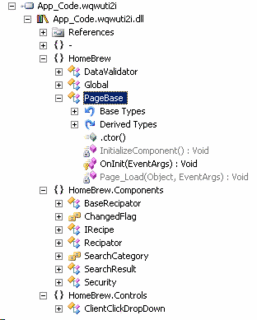
Yep, that's my app_code section of the site. Then I open the App_Web...
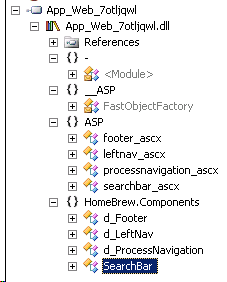
OK, not quite what I was expecting. Those are my controls (ascx), but I don't see my pages anywhere. Then I get what I expect from the global...
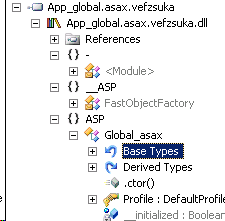
As you can see, this presents a new way of thinking about things like state managers, or custom configuration file readers. If you have this in application code, that code can no longer access instances of pages, nor can you late bind to these assemblies as they are not published by name to /bin.

I also use UIP on the site, which requires late binding, so that was one thing that was broken. The other was that I use a PageBase object for each page to create a master template style arrangement for common navigation, and footer - object instances of controls. The idea of a master template is built into asp.net 2.0, so I'll have to look at changing. In any event, the pages are also handled by a state manager. This is a business object which interacts with instances of pages and controls. Both of these concepts are broken in asp.net 2.0 because business logic classes (app_code) have no way of knowing about page classes. This problem is easily handled through a bit of indirection and late control binding as discussed here:

http://msdn.microsoft.com/asp.net/default.aspx?pull=/library/en-us/dnaspp/html/upgradingaspnet.asp

(look at the section on conversion issues)

This doesn't really put my code in a great place for 2.0, but does bring it to a point where it will compile. Because of the late binding, I actually end up having to move all of my app_code out to a separate assembly so I can reference it. I asked Scott Guthrie about this, and ended up having an interesting discussion (mostly with Simon Calvert actually) regarding the usefulness of the app_code section.

Simon gave the following reasons for the app_code architecture:

"App_code gives several benefits in developing applications:

it’s a known folder into which you can easily drop code files and not have to undergo any manual build step. This improves productivity in certain situations. App_code also has given semantics for arbitrary file extensions, not just regular code files. You can drop XSD or WSDL files and again, everything is done for you in the runtime. That is proxies are suto generated etc. Then in the designer tool, you get benefits in creating a class file and objects within the folder and have immediate intellisense and statement completion against your custom objects. This latter point is important in terms of productivity. If the app_code were a separate class library, then you would need to have separate projects, with references and undergo a build process in order to pull the updated class library to the web project.

App_code also allows sub-separation for specific scenarios like code languages, so you can easily separate out and manage the vb/c# in a shared code project for example

When using the app_code folder, the compilation process means that the assembly is compiled and that your pages all get references to that assembly automatically. It therefore is a separate assembly

Consuming types from the app_code folder is as simple as new-ing the type in your page codebehind for example and in cases where you might need the assembly name, we have strived to remove the requirement for the assembly name. For example, if you create a custom control in app_code then you can register it without referring to the assembly name. In cases where the name is required, you can use the moniker, “app_code”"

Well, I don't know enough yet about working in asp.net 2.0, so I am sure we'll find Simon's advice helpful as we move along. For my project, I still need that late binding so I have a separate assembly. They did mention potentially getting at the app_code via the BuildManager.GetType() method, but didn't expand on that, and I haven't looked into it.

My final issue to get the project actually working was to get SQL Server reconnected, and minor modification to an XmlValidatingReader (deprecated in 2.0) in the UIP to become an XmlReader with the proper attributes.

Submit this story to DotNetKicks
I purchased the book Crystal Clear by Alistair Cockburn (apparently pronounced "Koh-burn"). As I read it I will try to post highlights. Seems like it has some promise.
Submit this story to DotNetKicks